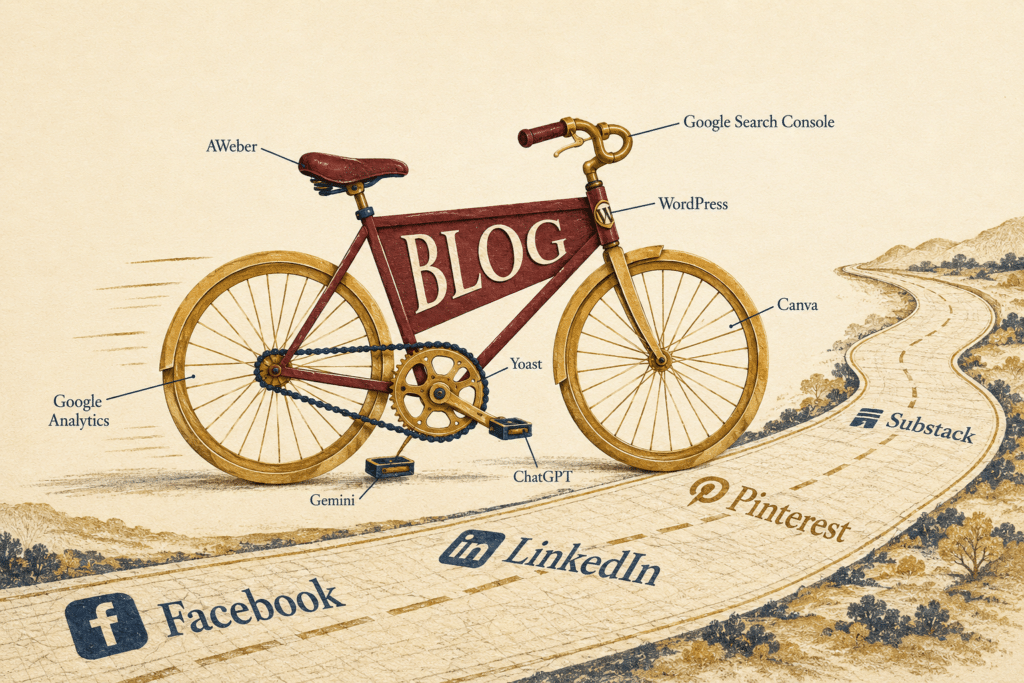
You went looking for the tools bloggers use to run a real business, and forty-five minutes later you have eleven tabs going, three free trials you did not mean to start, and a list of options that all promise to be the only one you will ever need. Every blogger you follow swears by a different setup, and a quiet part of you suspects that half of those recommendations are affiliate links wearing a friendly face.
What you actually need is simpler than the internet makes it look. The tools bloggers use come down to five jobs, not fifty products, and most of the ones that matter are free or close to it. You need a place you own, a way to be found, something that captures the people who show up, a way to make your work look like yours, and the places you send it out into the world. That is the whole stack, and everything else is a preference rather than a requirement.
The reason this matters is that the wrong tools do not only cost money. They cost the months you spend learning a system you will abandon, and the trust you lose when your setup looks stitched together with tape. A short stack you understand will carry you further than a long one you are afraid to touch. I have built online since 2008, across 17 years of digital marketing, and the stack I lean on now is shorter than the one I started with, not longer.
The tools bloggers use, sorted by the job they do
The first job is owning the place your work lives. That is WordPress, and I have written before about why it earns that spot when you look at which platform actually pays over the long run. A blog you control is the one piece of ground no algorithm can move out from under you. Build your whole business on a social feed and you are renting, and rent always goes up.
The second job is getting found. Yoast handles the on-page side, telling you whether a post is structured for search before you hit publish, and the free version covers everything a new blogger needs for years. Then there are the two tools most people skip and later wish they had kept. Google Search Console shows you which searches already bring people to you, and it is a free service from Google that helps you monitor how your site shows up in results. Google Analytics sits beside it and tells you what people do once they arrive. Neither one costs a dime, and together they end the guessing.
The third job is keeping the people who find you, and this is the one that turns a blog into a business. Your email list is the only audience you truly own, the one space no platform can switch off. For someone starting out, I point people to AWeber because it is simple enough to set up in an afternoon and it does the thing that matters, which is letting you follow up with the readers who raised their hand. You do not need the most powerful tool. You need the one you will keep using.
The fourth job is making your work look like it belongs to you, and you have more than one way to get there now. You can describe the image you want to ChatGPT or Gemini and get a featured image straight from a prompt, then bring it into Canva to add your headline, your brand colors, and the right size for a Pinterest pin. The tools have grown. The job has not. The image carries your work onto the page, so make it look like yours and reach for whichever one gets you there fastest.
The fifth job is sending your work where people already are. Substack, Pinterest, LinkedIn, and Facebook are not where your business lives, but they are the doors that walk people back to it. The trick is treating each one as a road home rather than a home itself, and I have broken down how one article can travel across all of them without writing five separate things.
What are the essential tools bloggers use to start a blog?
You need four to start. WordPress to own your site, Yoast to structure each post for search, an email tool like AWeber to capture readers, and Canva for your images. That is a working blog business stack on its own. Google Search Console and Google Analytics come next, both free, so add them the same week and let them gather data while you write.
Do you need to pay for blogging tools to make money?
No, you can run a real blog on mostly free tools for a long time. WordPress hosting is the one true cost, often a few dollars a month. Yoast, Search Console, Analytics, and Canva all have free plans that carry beginners for years. Paid tools earn their place later, once your traffic gives you an actual reason to reach for them.
The tools I skipped, and why
Here is the part most tool lists leave out, because it does not pay them to say it. I skipped almost everything in the first few years. I skipped the expensive all-in-one course platforms, the keyword tools that cost more than a week of groceries, the five scheduling apps, the paid pop-up builders, and the dashboards that repackaged what Google already handed me for free. None of that moved my income. What moved it was writing posts people searched for and sending them somewhere I owned.
The writing is the business. The tools are only the table it sits on. Buy the table when the writing is ready to be served, and not one moment before.
What is the best email tool for new bloggers?
For a new blogger, the best email tool is the simplest one you will keep opening, and that is usually AWeber. It lets you build a signup form, send a broadcast, and set up a welcome message without a steep learning curve. More powerful systems exist, but power you never touch is not an advantage. Start simple and grow into more once you have outgrown it.
How the tools bloggers use work together
A stack only pays you when the pieces connect. A post on your WordPress blog gets found through search because Yoast structured it. A reader lands, likes what she reads, and joins your AWeber list through a form you built in Canva. That same post becomes a Substack note, a LinkedIn update, and a Pinterest pin, each one a road back to the original. Google Search Console then tells you which of those roads carried the most people, so next month you build more of what already worked.
That is the difference between owning tools and running a system. Most people collect the first and never build the second. Years in, I run all of that connecting and tracking inside one place so I am not stitching pieces together by hand, but that is a decision for later, once the basics are earning their keep. In the beginning, the free stack and a little patience do the job.
I put the whole sequence, one article moving across six platforms and back to something you own, inside the Content Map, because seeing it laid out on a single page is what makes it click into place.
See the whole stack working as one system
The Content Map shows you how one article moves across six platforms and leads people back to what you own, so your work compounds instead of disappearing. If that is the piece you have been missing, this is where to start.
And if you just want to follow along while you build your own stack, the newsletter is the quiet door. It is where I share the real numbers and the next small step every week, with no pressure to do anything but read.
This one is for the writer who has bought enough tools already and wants to know which of the tools bloggers use actually earn their keep. You do not need a bigger cart. You need the jobs covered and the patience to let them compound.
The unpolished take
The tools bloggers use are the easiest part to overthink and the easiest place to spend money you do not need to spend. I have wasted plenty on shiny setups that promised to do the thinking for me, and not one of them ever wrote a post. The plain stack works because it gets out of your way and lets the writing do what only the writing can do. Pick the five, leave the rest in the tab you are about to close, and go write the thing that only you can write.
Be unpolished, Angela.
Tools only matter once the thing they support is earning, so if you are still weighing that part, can a blog really pay you is the better place to start.